Introduction
If you write blog posts in Arabic and occasionally include English words in the title — product names, company names, acronyms like API, VPN, MFA, or things like GitHub, OpenAI or YouTube — you’ve probably seen this.
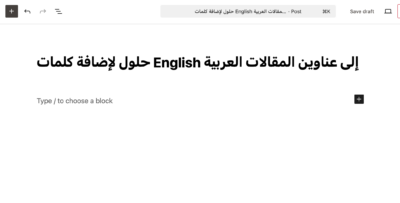
The title makes sense in your head, but on the screen it looks wrong… the words are scrambled. Spaces are off. Punctuation ends up in the wrong place, the cursor blinks at a misleading position, moving the cursor back and forth makes no visual sense.
Example:
إهمال شركة LastPass لمعايير التشفير خبر سيء لزبائن الشركة
Depending on the browser, font, or WordPress theme, LastPass may appear in the wrong position, or the sentence may look visually broken. This is not a WordPress bug. It’s not a theme issue either. It’s a bidirectional text problem and it is a general problem that should get fixed maybe on the OS GUI level.
The problem
English is LTR (left-to-right), while Arabic and Hebrew are RTL (right-to-left).
When you mix both in the same string, the browser applies the Unicode bidirectional algorithm and tries to “do the right thing”. However, without explicit direction markers, the Unicode Bidirectional Algorithms that browsers are currently using to render text fail to render the words in the correct order.
Until someone takes the time and effort to fix these algorithms and make a push to convince the community to adopt their fixes, this problem will remain, and we have to live with it and work around it. There are several options.
Solutions for WordPress
We will discuss here the following solutions:
- Changing the language of the blog
- Inline html style
- CSS class in the theme
- Using unicode markers
- Using plugins
Let’s discuss each of these solutions and their pros and cons.
Changing the language of the blog
A common suggestion is to switch WordPress to an RTL language (like Arabic) or an LTR language (like English), assuming that this will fix the rendering. Unfortunately, this does not solve the problem.
If your blog language is Arabic (RTL), English words in titles that starts with Arabic words will be rendered incorrectly.
It is Easy to implement. and it will fix the issue for RTL titles that contains LTR text. However, it forces users/admins to use RTL across the entire site when that is not necessarily desired, additionally, the same problem will appear if a LTR title contained some RTL text, which might be the case in a mixed languages blog.
Inline html style
One simple workaround is to explicitly tell the browser that a specific word or phrase should be rendered left-to-right (or right-to-left) using inline HTML attributes.
The most common approach is to wrap the English word in a span with a dir attribute:
إهمال شركة <span dir="ltr">LastPass</span> لمعايير التشفيرThis forces the browser to treat LastPass as an LTR segment, regardless of the surrounding Arabic text.
This solution is simple and easy to understand, it works in post content on most browsers and requires no theme changes. On the other side, it often does not work reliably in titles, especially in WordPress, also, some themes strip or escape HTML in titles, it also titles harder to edit and maintain, and it is not portable (copy-pasting the title elsewhere may break).
CSS class in the theme
Instead of applying direction rules to individual words, a more practical CSS approach is to target all title elements globally and force proper bidirectional isolation at the title container level.
The idea is to ensure each title is rendered as an isolated bidirectional context, and let the title follow the document’s natural direction (RTL or LTR) and finally prevent surrounding layout or punctuation from interfering.
Example:
/* Enforce proper bidi handling for all WordPress titles */
.entry-title,
.page-title,
.wp-block-post-title,
h1, h2, h3 {
  unicode-bidi: isolate;
}
or:
.entry-title,
.page-title,
.wp-block-post-title {
  direction: ltr;
  unicode-bidi: isolate;
}
It is a one-time fix, no changes are necessary to title text; It works for all existing and future titles; No plugins are required; It improves menues, widgets etc. But on the other hand, it cannot fully solve mixed RTL/LTR ordering, as the behaviour may still vary between browsers.
Using unicode markers
This is my recommended and standards-compliant solution.
Unicode defines invisible directional markers specifically for mixed RTL/LTR text. These markers tell the browser exactly how a segment should be treated, without relying on guessing. The recommended characters are:
| Name | Code point | Meaning | When to us |
|---|---|---|---|
| LRI | U+2066 | Start a left-to-right isolated segment | Inserting the start a LTR text inside a RTL title |
| RLI | U+2067 | Start a right-to-left isolated segment | Inserting the start a RTL text inside a LTR title |
| PDI | U+2069 | End the isolated segment | Ending the isolated segment |
Think of them as invisible brackets:
[LRI] English text [PDI] نص عربي ثمAnd the result is nice: “إهمال شركة LastPass لمعايير التشفير”
You won’t see the markers, but the browser will. The word LastPass is now fully isolated as LTR, and the rest of the sentence renders correctly.
This solutions works for several reasons: no HTML is required; it is theme-independent; it is copy/paste safe and it is fully supported by Unicode rendering algorithms and modern browsers. Because nothing is perfect, these characters are invisible and hard to type manually, one may need a keyboard shortcut or a special unicode keyboard to be able to add these invisible characters.
Once you know about them, however, this becomes the cleanest and most reliable solution.
For the sake of completion, you might see older solutions suggesting LRM/RLM and LRE/RLE/PDF… These are older bidi control characters and can work in some cases, but they are easier to misuse and less robust in modern text rendering. The isolate markers (LRI/RLI + PDI) are the modern best practice.
Using Plugins
WordPress plugins could theoretically “fix RTL/LTR issues” by making sure that titles containing mixed LTR and RTL text are stored with the correct Unicode markers. Plugins could also fix the theme css or even inject HTML wrappers or CSS rules around content.
While these plugins may help in some situations, they have limitations, as their behavior might depend on the theme, they also adds dependencies for a Unicode-level problem; they might also break during updates or migrations. On the bright side, they are easy to install, they remove the need for manual markup and might be an easy to use solution for non-technical users.
At the time of writing this article (Feb 2026), I couldn’t find any plugin that does that for blog titles. Maybe an opportunity to write a new plugin? I might write a plugin in the coming weeks.
Conclusion
Mixing Arabic (RTL) and English (LTR) in WordPress titles is not a bug, and it’s not something themes or plugins can fully fix. Most workarounds rely on HTML or CSS and only work in limited contexts, usually failing in titles and navigation elements. Unicode directional markers, on the other hand, are designed specifically for this problem. They work everywhere, require no styling, and produce correct rendering across browsers and platforms.
If you regularly write mixed-language titles, learning to use LRI and PDI is the one solution that actually solves the problem instead of hiding it. Once you start using them, broken titles simply stop being a thing.